Module Build Modes Overview
Last updated 7 months ago
Open this article on a separate tab
Time to Share Your Creation!
You've done it! Your content is complete, your characters are talking, your decisions are coaching learners - you've built something amazing. Now comes the exciting part: getting your creation into the hands of the people who need it.
You've already been using Preview Builds to test your work inside AliveSim Studio. Now it's time to take the next step and share your module with reviewers, testers, and eventually your learners.
🔍 Why This Matters:
Different audiences need different types of builds. Reviewers need development versions, while learners need final, polished experiences. Understanding build modes helps you control exactly who sees what version of your work.
Module Build Modes - The Gateway to Sharing
Here's your control center for taking your module public:
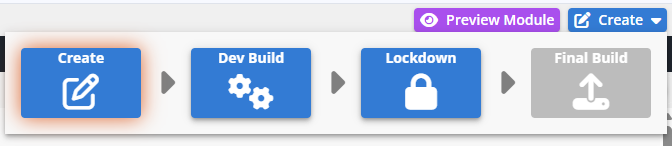
Each mode serves a specific purpose in your journey from creation to launch, giving you precise control over who sees your work and when.
A Quick Overview of All Four Modes
Create: Where you've been working - building content and making Preview builds for your own testing.
Development: Share unfinished work with reviewers and get feedback before final polish.
Lockdown: Prepare your module for final release - no more changes allowed.
Final: The finished product, ready for learners with full analytics tracking.
Development Builds - Ready for Reviewers
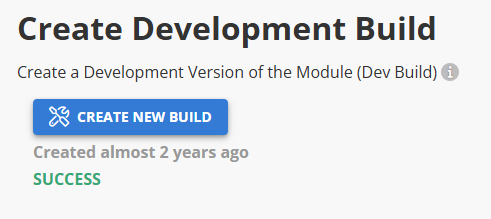
Why create a Development Build? Your module works great, but you want feedback before calling it "final." Maybe you need SME approval, maybe you want colleagues to test the flow, or maybe you just want a second set of eyes on your scenarios.
Development Builds let you share your work with people who don't have AliveSim Studio access. They get a special link, they can experience the full module, and you get their feedback - all while you continue making improvements.
💡 Dev Builds are Perfect for:
SME reviews, colleague feedback, beta testing with internal teams, or getting approval before final release.
What happens: You create a Development Build, then add it to a Group (more on Groups later) to control access. Reviewers get a launch link through the Group setup and can experience the full module while you continue making improvements in Create mode.
The beauty: Development builds are separate from your ongoing work. You can create a new Dev build anytime to share your latest improvements.
Lockdown - Preparing for Prime Time
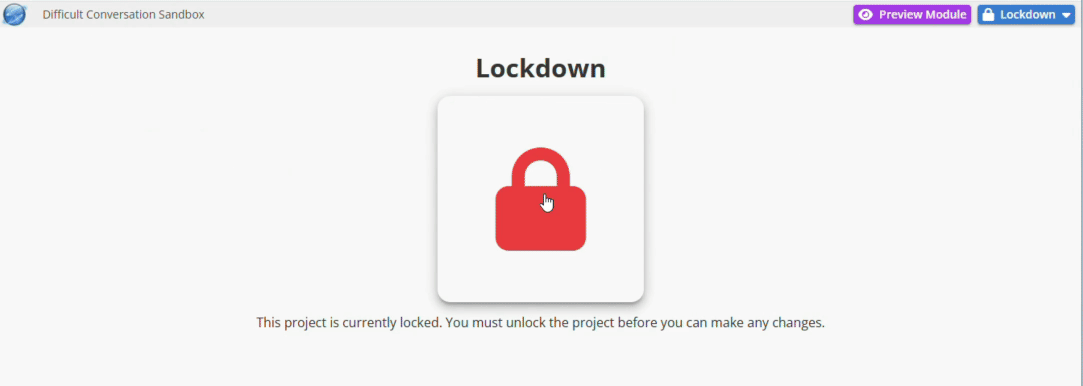
Why use Lockdown? You're confident your module is ready for learners. Lockdown prevents any accidental changes and prepares everything for the final build process.
⚠️ Important:
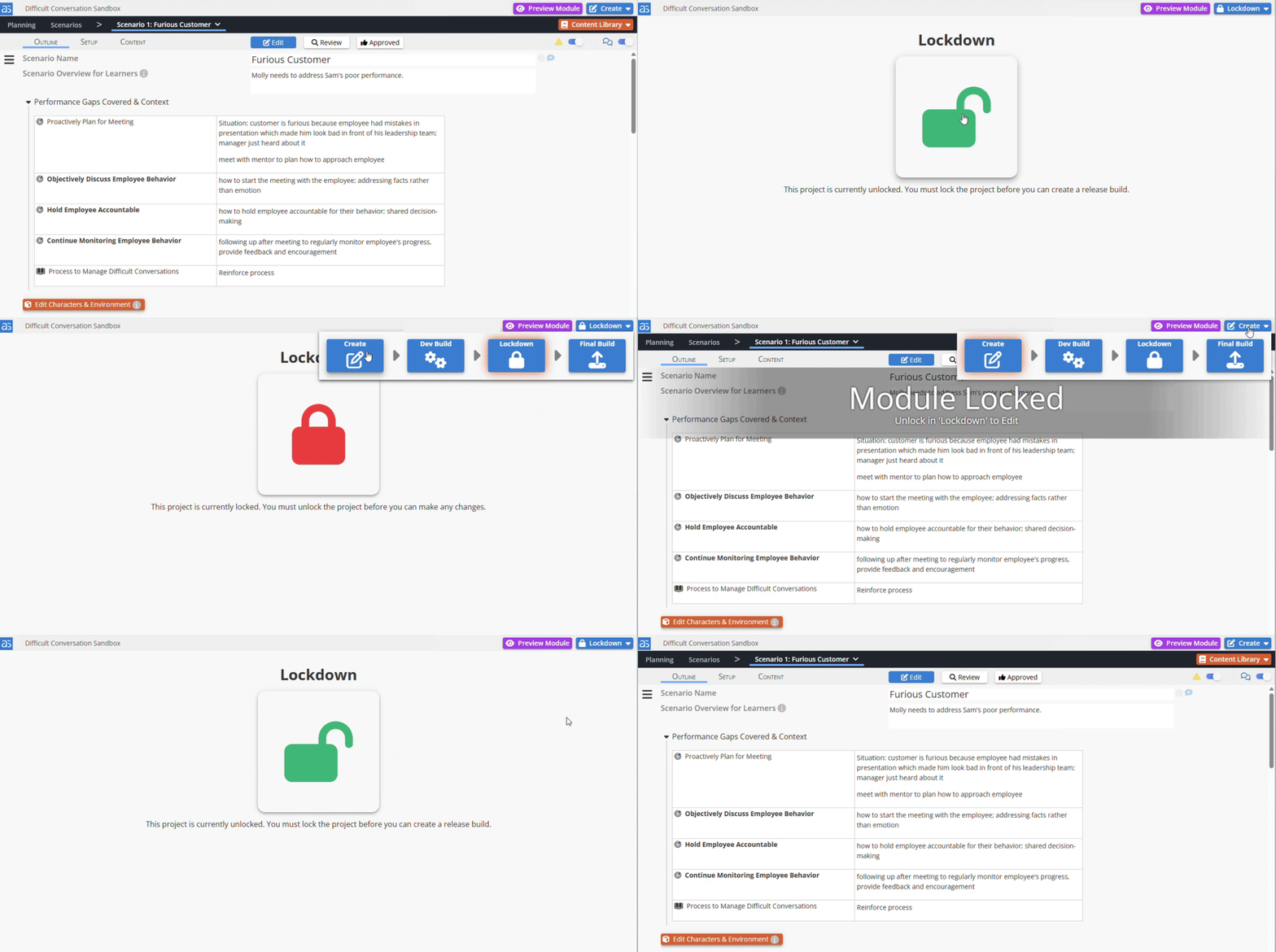
Once locked down, you can't make edits. But don't worry - you can always unlock, switch back to Create mode, make changes, and lock down again.
Need to make changes? Simply unlock the module (there's a clear unlock option), switch back to Create mode, make your edits, then lock down again when ready.
Final Build - Launch Time!
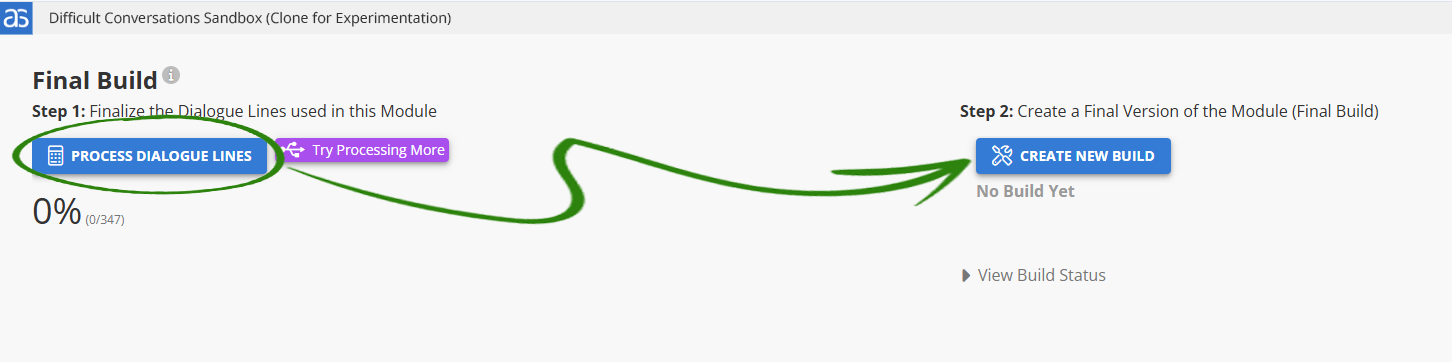
This is it - your module is ready for the world!
Final Builds are the polished, complete version that your learners will experience. Here's what makes them special:
The Final Build Process - Two Important Steps
Step 1: Process Dialogue Lines
All your AI-generated voices get saved as permanent audio files. No more AI surprises or mispronunciations - every word is locked in exactly as you want it.
Step 2: Create Final Build
Your complete module gets packaged for distribution with full analytics tracking enabled.
⚠️ Analytics Clarification:
Creating a Final Build doesn't automatically start analytics collection. Analytics only begin when learners actually access your module through the Group link you'll set up. You can safely create Final Builds without worry - the tracking starts when real learners begin using it.
💡Pro Tip:
Still want to test? Create one more Development Build for final testing, then come back and make your Final Build when you're absolutely ready.
Deliver Your Module to Your Audience
Once you have your Final Build, you'll add it to a Group - this is where you'll control who can access it and generate the launch links to share with your learners.
🔍 What's Next:
Groups control distribution. You'll create Groups for different audiences (like "New Hire Training" or "Manager Development"), add your builds to the appropriate Groups, and share the resulting links. We'll cover this complete process in the Groups Overview article.
⚠️ Analytics are turned on!
Don’t contaminate your analytics with testing. For final testing, create a Development Build instead. Run through once when final if you must. 😊
The Big Picture Journey:
Development Build ➜ Share with reviewers and get feedback
Lockdown ➜ Protect your content and prepare for final release
Final Build ➜ Launch to your learners with full tracking
Your Creation is About to Make an Impact
You've put tremendous thought and creativity into this module. Now you get to see it fulfill its purpose - helping people develop skills that matter in their work.
💡 Remember:
Start with Development Builds for testing and approval, then move to Final Builds when you're ready to measure real impact!
Your scenarios are about to change how people perform. Let's get them out there!
Powered by Syandus Immersive Learning Technology